Make your Web Apps 100x More Usable with UXCanvas & Claude Code
Here's the uncomfortable truth: AI coding tools are fluent in logic but illiterate in experience. You can't feel the interface until the code is done.
You've burned three days on backend architecture, database schemas, API endpoints, and deployment configs. Then you finally see the UI. It's wrong. The user flow is awkward. The data you're surfacing isn't what users actually need. The interaction patterns don't match how people actually think.
Now you're refactoring everything. Again.
Twenty-two years of building software, and I've made this mistake more times than I'll admit. Here's what I finally understood: The UI isn't the skin. It's the skeleton. Everything else exists to serve it.
So I restructured my entire Claude Code SDLC process around one principle: touch and feel the UI before you write backend code.
The Tool That Fixed This
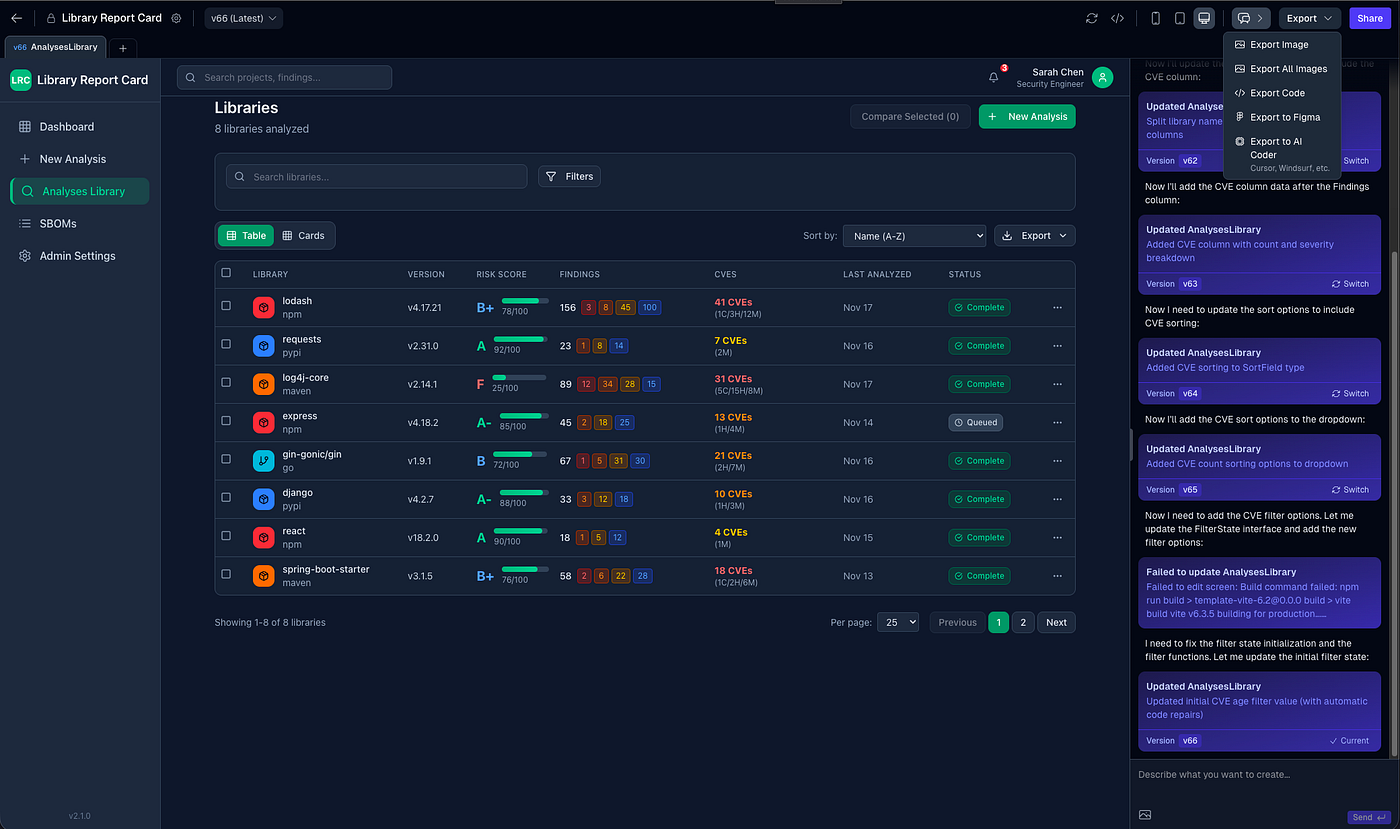
UXCanvas.ai sits between my requirements and my implementation. The pitch is simple: describe what you want, get a visual prototype in minutes, hand clean code to your AI tools. The value isn't generation speed. It's iteration speed. Argue with your design before you marry your architecture.
You say "Create a dashboard with a sidebar, metrics cards, and a dark theme." The AI generates it instantly. You refine: "Make the sidebar collapsible, add a user avatar." It adapts.
When you're happy with it, you export:
- Production-ready React components with TypeScript
- HTML with Tailwind CSS
- Figma files
No design skills required. Just the ability to articulate what you want.
My Two-Command Workflow
I built two custom commands that put UXCanvas at the center of my development process. Here's how they work.
Command 1: /project:ux (Transform Requirements to Research)
This transforms product requirements into user experience artifacts. (The research that should exist before any design tool opens.) It runs through four phases:
Phase 1: Document Discovery
The system locates PRD and SRS files, then extracts the human elements: user personas, pain points, actual user quotes, and journey maps. From the SRS, it maps API endpoints to potential UI elements and database tables to screens.
Phase 2: UX Context Discovery
The system asks me targeted questions:
- Design system: Do I have an existing component library?
- Visual aesthetic: Minimal, modern, playful, or professional?
- Platform priority: Mobile-first or desktop-first?
- Usage context: Office, home, or on-the-go?
- Accessibility level: WCAG A, AA, or AAA?
Phase 3: User Research Artifacts
The system generates:
- Empathy maps: What users think, feel, do, and struggle with
- User journeys: Entry to exit (including error recovery)
- Information architecture: Navigation and content hierarchy
- Interaction patterns: Form behavior, loading states, and transitions
Phase 4: UXCanvas Prompt Generation
The output: Optimized prompts for UXCanvas:
- Component specifications with data requirements
- Screen-by-screen descriptions
- Accessibility annotations
- Responsive requirements
Command 2: /project:ui (From Designs to Implementation)
After refining designs in UXCanvas, this command bridges the gap to actual code.
This is where UXCanvas connects to Claude Code. You export screenshots of your design along with a structured prompt containing links to download the generated Next.js pages and component artifacts. That prompt becomes the input for my /project:ui command.
Phase 1: Document Discovery & Analysis
It locates everything (PRD, SRS, UX research, UXCanvas prompts and images), parses the project ID, version, and component inventory, then reads the screen images to understand layout structure, visual hierarchy, and data placement.
Phase 2: Component Inventory
The system extracts component URLs from UXCanvas and creates an inventory: component name, description, code URL, and category.
Phase 3: API-to-Component Mapping
For each UI component, it identifies data requirements, maps them to SRS API endpoints, connects them to database schemas, and documents state management needs.
Phase 4: Implementation Plan
The output is three files:
ui-implementation-{product}.md: Detailed component specificationscomponent-api-mapping-{product}.md: Quick reference matrixui-changes-summary-{product}.md: Cross-references back to PRD and SRS
Flip Your Process
Backend-first development is like writing a love letter before you've met the person. So flip it.
- Use UXCanvas or a similar tool
- Build the visual prototype
- Map your components to your data requirements
- Then let your AI tools work. They'll have complete context.
The code will be cleaner. The refactoring will be minimal. And you'll ship with confidence instead of anxiety.
The /project:ux and /project:ui are part of my broader Claude Code SDLC process (blog post | GitHub repository)